

If you travel from Malaysia, you have probably seen Trip.com in search results, ads and app stores. It covers flights, hotels, trains, attractions and more, and it is a popular choice for budget-conscious travellers. But is it actually good value? And how do you get the best price on it?
This blog combines a practical Trip.com Malaysia review with a step-by-step method for booking cheaper flights and hotels. You will learn what the platform does well, where to be careful, and how to use Trip.com vouchers, rewards and smart timing to lower your total.
Note: Prices, fees, loyalty rules, refund policies and promotions change frequently and can differ by route, supplier and account. This review reflects general patterns, not guaranteed outcomes. Always confirm the live total and terms before you pay.
What Is Trip.com?
Trip.com is an online travel agency operated by Trip.com Group, which has roots in Ctrip, one of China’s best-known travel brands. For Malaysian travellers, it offers:
- Flights: A mix of full-service and low-cost carriers, with many international and regional routes.
- Hotels and stays: From budget hotels to resorts and apartments in Malaysia and overseas.
- Trains and transport: Rail tickets and transfers in selected destinations.
- Attractions and tours: Tickets and activities at many destinations.
- Travel add-ons: Such as eSIMs, insurance and car services, depending on availability.
Because everything is in one app, you can plan and compare a trip without switching between multiple platforms.

Trip.com Malaysia Review: The Pros and Cons
What Trip.com does well
- Broad flight search. You can compare many airlines and routes in one search, including low-cost carriers and full-service airlines.
- Flexible date tools. Calendar-style views help you spot cheaper days around your preferred date.
- Competitive hotel pricing. Many properties, especially in Asia, are priced competitively, and member rates or promotions may lower the cost further.
- Frequent promotions. Trip.com regularly runs campaigns, coupons and limited-time offers.
- Rewards and membership perks. Booking can earn points or benefits that reduce future costs, depending on the current programme.
- Pay in ringgit. You can often book in MYR, which makes budgeting simpler.
- Strong coverage in Asia. It is especially useful for China, Hong Kong, Japan, Korea and Southeast Asia trips.
What to watch out for
- Price differences at checkout. A low headline fare can grow after fees, baggage or seat selection, so compare the final total.
- Third-party booking complexity. Because you book through an agency, changes and refunds may involve both Trip.com and the airline or hotel, which can slow things down.
- Fare and rate conditions vary. Cheap rates are often non-refundable or have strict change rules.
- Customer service experiences vary. Reported experiences differ by case and by season, so keep screenshots and confirmations in case you need support.
- Promotions have conditions. Many vouchers need a minimum spend, a specific product type or a particular payment method.
Is Trip.com worth using?
For many travellers, yes, as one of several platforms to compare. It is rarely wise to treat any single site as the cheapest every time. Use Trip.com as part of a quick comparison, then book where the final price and conditions suit you best.
How to Book Cheap Flights on Trip.com
Step 1: Be flexible with dates
Prices vary heavily by day. Use the flexible date or calendar view to compare nearby days, and consider shifting your trip by a day or two. Mid-week flights are often cheaper than Fridays and Sundays, and off-peak seasons usually cost less.
Step 2: Compare airports and routes
Search nearby airports when it makes sense. For example, a Kuala Lumpur departure may be cheaper than another airport, or a connecting route might undercut a direct one. Remember that a cheap connection can cost you time, and a short layover can be risky if you book separate tickets.
Step 3: Compare the total, not just the fare
Low-cost carriers often charge separately for baggage, seats and meals. Add those costs to your comparison, and check what the fare includes before you commit.
Step 4: Use price alerts and watch trends
If you are not ready to book, track the route or set an alert in the app when available. Prices can move up and down, and alerts help you act when a fare looks good.
Step 5: Book at the right time
There is no perfect rule, but a few guidelines help:
- Domestic and short-haul: Book a few weeks to a couple of months ahead for the best balance of price and choice.
- Long-haul and peak seasons: Book earlier, especially for school holidays, Chinese New Year, Hari Raya and year-end travel.
- Sale periods: Airlines and platforms often run campaigns. Keep an eye out, but do not wait if the current fare already fits your budget.
Step 6: Apply a voucher or promo code
Before you pay, check for a valid Trip.com promo code and confirm the total changes at checkout. Vouchers may apply only to certain products, routes or payment methods.
Step 7: Read the fare rules
Check refund, change and baggage terms. A non-refundable ticket can be a good price if your plans are firm, but a flexible fare can be cheaper in the long run if your dates may change.
How to Book Cheap Hotels on Trip.com
Step 1: Filter smartly
Use filters for price range, rating, location, free cancellation, breakfast and facilities. A cheaper hotel far from transport can cost more in taxis, so consider location, not just nightly rate.
Step 2: Compare the total price
Check taxes, service charges and any local fees. In Malaysia, for example, tourism tax may apply for international visitors and may be collected at the property. Confirm what is included.
Step 3: Read recent reviews
Look at recent guest reviews for cleanliness, noise, check-in experience and accuracy of photos. A slightly higher rate at a better-reviewed hotel often beats a bargain you regret.
Step 4: Choose the right rate type
- Free cancellation: Better if your plans might change or you want to rebook if prices fall.
- Non-refundable: Often cheaper, but only if your dates are fixed.
- Pay now vs pay later: Paying later keeps your cash free, but the terms vary by property.
Step 5: Combine and compare
Check whether a flight and hotel package is cheaper than booking separately, and compare against booking directly with the hotel, which may offer perks like breakfast or late checkout.
Step 6: Use a voucher
Try a current Trip.com voucher code on your hotel booking and confirm it applies to the rate you chose.
Trip.com Promo Codes, Vouchers and Discount Codes
Coupons are one of the most direct ways to lower your final total. You may see them labelled as a promo code, voucher code or discount code, but they all do broadly the same thing: reduce the amount you pay on an eligible booking.
Where to find them
- In the Trip.com app: Check the coupon or vouchers section in your account.
- Campaign pages: Sale periods often come with limited-time offers.
- Coupon aggregators: iPrice collects current offers in one place, including a Trip.com discount code page that is handy for quick checks.
- Bank and e-wallet partnerships: Some offers are tied to specific cards or payment methods.
- Emails and notifications: Targeted offers sometimes arrive this way.
Common conditions
- Minimum spend or booking value.
- Eligible products only, such as hotels, flights or specific routes.
- New users, app-only bookings or selected payment methods.
- Limited validity periods and redemption caps.
- Restrictions on stacking with other offers.
How to use a code properly
- Select your flight or hotel first.
- Go to checkout and find the coupon or promo section.
- Apply the voucher, promo or discount code.
- Confirm the total drops before you pay.
- If it fails, read the terms and try another one.
Rewards and Membership
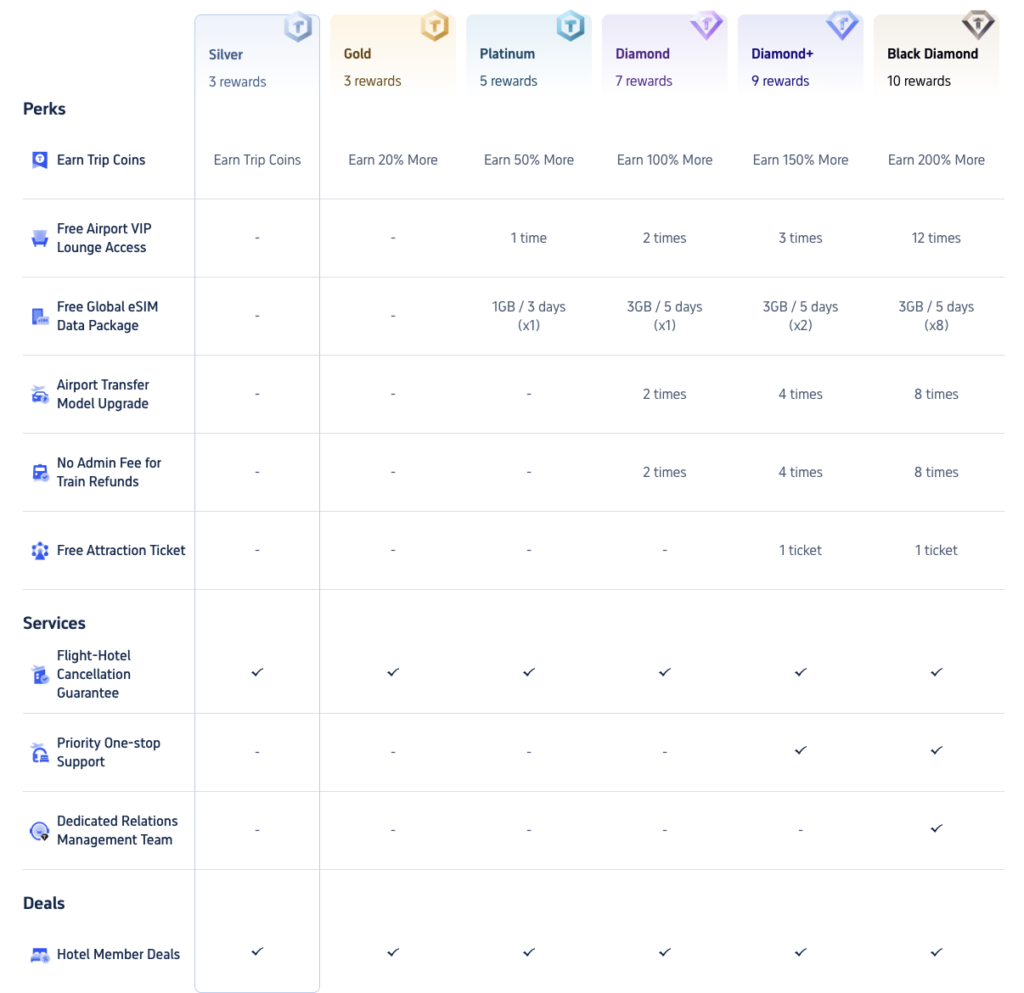
To get the most out of it:
- Always log in before booking so your purchase is tracked.
- Check the points value and any expiry dates.
- Use rewards on bookings you were already planning, rather than buying more just to earn points.
- Compare the programme’s value with other platforms you use regularly.
If you travel only occasionally, rewards will matter less than the base price. If you travel often, consistent use of one programme can add up.
Payment, Currency and Fees
- Pay in MYR when possible. It avoids foreign exchange surprises.
- Check card fees. Your bank may charge foreign transaction fees on overseas payments.
- Look for payment promotions. Some cards and e-wallets offer discounts or cashback.
- Watch for service or booking fees. These may appear at the final step.
- Keep proof of payment. Save confirmation emails and receipts.
Changes, Cancellations and Refunds
Because Trip.com acts as an intermediary, rules depend on the airline or hotel’s policy as well as the platform’s process.
- Before booking: Read the fare or rate conditions carefully.
- After booking: If you need to change dates or cancel, act as early as possible, since fees often rise closer to departure.
- Refund timing: Refunds may take time, especially if the supplier must approve them.
- Keep records: Save booking numbers, screenshots and messages in case you need support.
If your travel plans are uncertain, spending a little more on a flexible option can save you money and stress.
Customer Service and Reliability
Online travel agencies handle huge volumes of bookings, so service experiences can vary. A few habits help:
- Use in-app chat or official contact channels, not unofficial numbers found online.
- Have your booking reference ready before contacting support.
- Keep proof of any problem, such as screenshots of the booking page or airline notices.
- Confirm important details directly with the airline or hotel before you travel, such as flight times, baggage allowances and check-in requirements.
- Avoid last-minute changes where possible, since support queues can be longer near travel dates.
Trip.com vs Other Booking Sites
No single platform is cheapest on everything. Here is how to think about the choice:
| Booking method | Why use it | Watch out for |
| Trip.com | Broad flight and hotel coverage, frequent promotions, Asia strength | Fees and conditions vary, third-party process for changes |
| Other online travel agencies | Different promotions and loyalty programmes | Prices and terms may differ for the same booking |
| Airline or hotel direct | Often simpler changes and sometimes perks | May not be the cheapest base price |
| Meta-search sites | Quick price comparison across providers | You still book on the provider’s site |
The smartest approach: check Trip.com plus at least one alternative, then compare the final total, cancellation rules and convenience.
A Pre-Booking Checklist
Before you tap “Pay”, run through this list:
- Have I compared more than one date and airport option?
- Does the price include baggage, seats and fees I need?
- Have I compared Trip.com with another platform or direct booking?
- Did I try a valid Trip.com promo code or voucher?
- Do I understand the cancellation and change rules?
- Is the hotel location convenient, and are recent reviews good?
- Does my passport meet the validity and visa requirements?
- Have I saved confirmation emails and receipts?
Frequently Asked Questions
Is Trip.com legit and safe to use in Malaysia?
Trip.com is a well-known international online travel agency. As with any platform, book through the official app or website, check conditions carefully and keep records of your booking.
Is Trip.com cheaper than booking direct?
Sometimes. Trip.com can offer competitive prices and promotions, but airlines and hotels may match or beat them on certain dates. Always compare the final total.
Does Trip.com have a promo code for Malaysian users?
Offers change often. You can check the app’s coupon section and the Trip.com promo code page for current options, then read the terms before relying on one.
What is the difference between a promo code, voucher code and discount code?
In practice, they are used interchangeably. Each refers to a code or coupon that lowers the price on an eligible booking, subject to conditions.
Can I cancel or change a Trip.com booking?
That depends on the fare or hotel rate you chose. Some are flexible, others are non-refundable. Check the conditions before you book and act early if you need changes.
When is the best time to book flights?
It varies by route and season. Booking a few weeks to a couple of months ahead works for many trips, and earlier for peak holidays. Use price alerts to track fares.
Should I book flights and hotels together?
Compare both ways. Packages can sometimes be cheaper, but separate bookings may offer more flexibility or better rates.
Are third-party coupon sites safe?
Reputable coupon sites list codes and link to the official platform. Never enter your Trip.com password, OTP or card details on a site offering to unlock a code.
Final Verdict
Trip.com is a capable booking platform for Malaysian travellers, with wide flight and hotel coverage, regular promotions and useful search tools. Its main strengths are choice, flexibility in searching and frequent deals, while its main risks are hidden extras, varying fare rules and the added layer of an intermediary when you need changes.
To get the best value, compare dates and total prices, read the conditions, choose the right fare or rate type, and check a current Trip.com discount code on iPrice Malaysia or NST before you pay. A few minutes of comparison can easily outweigh any single coupon.
